 mmiscool
Apr 21, 2015
mmiscool
Apr 21, 2015
Using an Arduino as a slave board
Arduino serial interfacing and basic function libraryTable of Contents

Home automation, Robots, Vending machines. What do they have in common?
The answer is computers controlling hardware. Making lights go on and off. Controlling motors, relays and other electronic components.
Liberty Basic for windows makes programming simple but lacks the ability to directly control or interface with hardware (except the parallel port).
To make hardware interface coding simpler a set of functions is required to facilitate the communication with external hardware. Because the arduino is the most widely used hobby micro controller in the world and has so much support it is the obvious choice make a set of simple functions for LB users to take advantage of this great platform for there projects.
The things covered in this article are limited to simple port I/O (Input and output).
- Test if pin is high or low
- Get input from buttons and other sensors connected to the arduino
- Set a pin high or low
- Turn things on and off like lights, buzzers, motors, ect.
- PWM (Pulse width modulation) output
- Dim lights, Control servo motors, interface with variable speed motor controllers
- PWM (Pulse width modulation) input
- Get input from things like sliders and position information
The Arduino Code
To make liberty basic talk with an arduino they have to speak the same language.In this case a string is used and send over to the device followed by a carriage return character CHR$(13)
The only thing you really have to understand about the arduino code is that it must be download to the arduino board using the arduino IDE.
This can be download from the following link.
http://arduino.cc/en/Main/Software
Note: This code is done in arduinos special form of c and is not basic code.
 // Buffer to store incoming commands from serial port
 String inData;

 void setup() {
 Serial.begin(9600);
 Serial.println("Serial conection started, waiting for instructions...");
 }

 void loop() {
 while (Serial.available() > 0)
 {
 char recieved = Serial.read();
 inData += recieved;

 // Process message when new line character is recieved
 if (recieved == '\n')
 {
 String Param0 = getValue(inData, ' ', 0);
 String Param1 = getValue(inData, ' ', 1);
 String Param2 = getValue(inData, ' ', 2);
 String Param3 = getValue(inData, ' ', 3);
 String Param4 = getValue(inData, ' ', 4);
 String Param5 = getValue(inData, ' ', 5);

 inData = "";

 int valParam0 = Param0.toInt();
 int valParam1 = Param1.toInt();
 int valParam2 = Param2.toInt();
 int valParam3 = Param3.toInt();
 int valParam4 = Param4.toInt();
 int valParam5 = Param5.toInt();


 //Serial.print(valParam0);
 //Serial.print(valParam1);
 //Serial.print(valParam2);
 //Serial.print(valParam3);
 //Serial.print(valParam4);
 //Serial.print(valParam5);


 if ( Param0 == "get")
 {
 pinMode(valParam1, INPUT);
 Serial.println(digitalRead(valParam1));


 }

 if ( Param0 == "set")
 {
 pinMode(valParam1, OUTPUT);
 digitalWrite(valParam1, valParam2);
 Serial.println("1");


 }


 if ( Param0 == "pwm.out")
 {
 analogWrite(valParam1, valParam2);
 Serial.println("1");

 }


 if ( Param0 == "pwm.in")
 {
 Serial.println(analogRead(valParam1));
 }

 }
 }
 }


 String getValue(String data, char separator, int index)
 {
 int found = 0;
 int strIndex[] = {
 0, -1 };
 int maxIndex = data.length()-1;
 for(int i=0; i<=maxIndex && found<=index; i++){
 if(data.charAt(i)==separator || i==maxIndex){
 found++;
 strIndex[0] = strIndex[1]+1;
 strIndex[1] = (i == maxIndex) ? i+1 : i;
 }
 }
 return found>index ? data.substring(strIndex[0], strIndex[1]) : "";
 }
The Liberty Basic Demo
| The demo program shows off the basic functionality of the library. The Com port that the arduino is on must be placed in the com port number text box. A pin must be selected and a value to send must be entered. The 4 buttons on the right are used to execute the functions. The return value is populated by the what is returned by the arduino. | 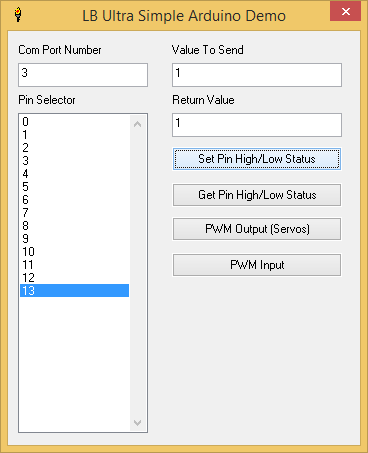 |
print AD.start()
dim
'Populate pin list
dim pins$(100)
for x = 0 to 13
pins$(x) = str$(x)
next x
dim Comm.Ports$(10)
for x = 0 to 10
Comm.Ports$(x) = str$(x)
next x
'nomainwin
WindowWidth = 360
WindowHeight = 445
UpperLeftX=int((DisplayWidth-WindowWidth)/2)
UpperLeftY=int((DisplayHeight-WindowHeight)/2)
listbox #main.PinSelector, pins$(, [listbox1DoubleClick], 10, 82,
listbox #main.PinStatuses, pin.statuses$(, [listbox1DoubleClick], 90, 82, 50, 320
statictext #main.statictext2, "Pin Selector", 10, 62, 130, 20
textbox #main.ValToSend, 165, 32, 170, 25
statictext #main.statictext4, "Value To Send", 165, 12, 170, 20
statictext #main.statictext5, "Return Value", 165, 62, 175, 20
textbox #main.ReturnValue, 165, 82, 170, 25
button #main.button7,"Set Pin High/Low Status",[Set.Pin], UL, 165, 117, 170, 25
button #main.button8,"Get Pin High/Low Status",[Get.Pin], UL, 165, 152, 170, 25
button #main.button9,"PWM Output (Servos)",[PWM.Out], UL, 165, 187, 170, 25
button #main.button10,"PWM Input",[PWM.In], UL, 165, 222, 170, 25
statictext #main.statictext11, "Com Port Number", 10, 12, 145, 20
combobox #main.ComPortNo, Comm.Ports$(), [update.pin.info], 10, 32, 130, 25
open "LB Ultra Simple Arduino Demo" for dialog as #main
print #main, "trapclose [quit.main]"
wait
[Set.Pin]
gosub [Get.The.Selctions.And.Textboxes.From.Main.Win]
return.value = AD.Set(Com.port.Selection, Pin.Selection, Val.To.Send)
print #main.ReturnValue, return.value
goto [update.pin.info]
[Get.Pin]
gosub [Get.The.Selctions.And.Textboxes.From.Main.Win]
return.value = AD.Get(Com.port.Selection, Pin.Selection)
print #main.ReturnValue, return.value
goto [update.pin.info]
[PWM.Out]
gosub [Get.The.Selctions.And.Textboxes.From.Main.Win]
return.value = AD.PWM.Out(Com.port.Selection, Pin.Selection, Val.To.Send)
print #main.ReturnValue, return.value
goto [update.pin.info]
[PWM.In]
gosub [Get.The.Selctions.And.Textboxes.From.Main.Win]
return.value = AD.PWM.In(Com.port.Selection, Pin.Selection)
print #main.ReturnValue, return.value
goto [update.pin.info]
[quit.main]
close #main
bla = AD.close.all.the.com.ports()
end
[Get.The.Selctions.And.Textboxes.From.Main.Win]
print #main.ValToSend, "!contents? Val.To.Send";
print #main.ComPortNo,
print #main.PinSelector, "selection? Pin.Selection"
return
[update.pin.info]
gosub [Get.The.Selctions.And.Textboxes.From.Main.Win]
dim pin.statuses$(13)
for x = 0 to 13
pin.statuses$(x) = str$(ad.pinstatus(Com.port.Selection,x))
next x
print #main.PinStatuses, "reload"
wait
'Begin Arduino Code here -------------------------------------------------------
'These functions can be added to any program to provide arduini power input and output
'Descriptions for functions are in there comments
'these are the funtions you call to get the arduino to do your bidding
function AD.Set(com.port, PinNo, value)
'Set an Arduino pin high or low,
'Will return 1 one if successful, 0 if not
AD.Set = val(AD.talk.to.device$(com.port,"set ";PinNo;" ";value))
ad.pinstatus(com.port,PinNo) = value
end function
function AD.Get(com.port, PinNo)
'Will return the current state of the input pin
'1 for high, 0 for low
AD.Get = val(AD.talk.to.device$(com.port,"get ";PinNo))
end function
function AD.PWM.Out(com.port, PinNo, value)
'Set the PWM output on the select pin to the value
'Will return a 1 for success and 0 for failure.
AD.PWM.Out = val(AD.talk.to.device$(com.port,"pwm.out ";PinNo;" ";value))
ad.pinstatus(com.port,PinNo) = value
end function
function AD.PWM.In(com.port, PinNo)
'Get the PWM input from the pin
'Will return a value of 0 to 1023
AD.PWM.In = val(AD.talk.to.device$(com.port,"pwm.in ";PinNo))
end function
'end of function to call to have the arduino do your bidding
Function AD.talk.to.device$(port,msg$)
'Send a Message to the arduino and return the result sent back by the device
'this function is called by the other functions above
if msg$ <> "" then
'Open the com port
select case port
case 1
if ad.com.ports(1) <> 1 then
open "COM" ; port ; ":9600,n,8,1" for random as
ad.com.ports(1) = 1
end if
case 2
if ad.com.ports(2) <> 1 then
open "COM" ; port ; ":9600,n,8,1" for random as #ArduinoCOMPort2
ad.com.ports(2) = 1
end if
case 3
if ad.com.ports(3) <> 1 then
open "COM" ; port ; ":9600,n,8,1" for random as #ArduinoCOMPort3
ad.com.ports(3) = 1
end if
case 4
if ad.com.ports(4) <> 1 then
open "COM" ; port ; ":9600,n,8,1" for random as #ArduinoCOMPort4
ad.com.ports(4) = 1
end if
case 5
if ad.com.ports(5) <> 1 then
open "COM" ; port ; ":9600,n,8,1" for random as #ArduinoCOMPort5
ad.com.ports(5) = 1
end if
case 6
if ad.com.ports(6) <> 1 then
open "COM" ; port ; ":9600,n,8,1" for random as #ArduinoCOMPort6
ad.com.ports(6) = 1
end if
case 7
if ad.com.ports(7) <> 1 then
open "COM" ; port ; ":9600,n,8,1" for random as #ArduinoCOMPort7
ad.com.ports(7) = 1
end if
case 8
if ad.com.ports(8) <> 1 then
open "COM" ; port ; ":9600,n,8,1" for random as #ArduinoCOMPort8
ad.com.ports(8) = 1
end if
case 9
if ad.com.ports(9) <> 1 then
open "COM" ; port ; ":9600,n,8,1" for random as #ArduinoCOMPort9
ad.com.ports(9) = 1
end if
case 10
if ad.com.ports(10) <> 1 then
open "COM" ; port ; ":9600,n,8,1" for random as #ArduinoCOMPort10
ad.com.ports(10) = 1
end if
end select
'Send message to device
select case port
case 1
'Wait until there is a carriage return
while foundLF = 0
while lof(#ArduinoCOMPort1) > 0
temp$ = input$(#ArduinoCOMPort1, 1)
buffer$ = buffer$ + temp$
if temp$ = chr$(13) then
foundLF = 1
exit while
end if
wend
wend
case 2
print #ArduinoCOMPort2, msg$
'Wait until there is a carriage return
while foundLF = 0
while lof(#ArduinoCOMPort2) > 0
temp$ = input$(#ArduinoCOMPort2, 1)
buffer$ = buffer$ + temp$
if temp$ = chr$(13) then
foundLF = 1
exit while
end if
wend
wend
case 3
print #ArduinoCOMPort3, msg$
'Wait until there is a carriage return
while foundLF = 0
while lof(#ArduinoCOMPort3) > 0
temp$ = input$(#ArduinoCOMPort3, 1)
buffer$ = buffer$ + temp$
if temp$ = chr$(13) then
foundLF = 1
exit while
end if
wend
wend
case 4
print #ArduinoCOMPort4, msg$
'Wait until there is a carriage return
while foundLF = 0
while lof(#ArduinoCOMPort4) > 0
temp$ = input$(#ArduinoCOMPort4, 1)
buffer$ = buffer$ + temp$
if temp$ = chr$(13) then
foundLF = 1
exit while
end if
wend
wend
case 5
print #ArduinoCOMPort5, msg$
'Wait until there is a carriage return
while foundLF = 0
while lof(#ArduinoCOMPort5) > 0
temp$ = input$(#ArduinoCOMPort5, 1)
buffer$ = buffer$ + temp$
if temp$ = chr$(13) then
foundLF = 1
exit while
end if
wend
wend
case 6
print #ArduinoCOMPort6, msg$
'Wait until there is a carriage return
while foundLF = 0
while lof(#ArduinoCOMPort6) > 0
temp$ = input$(#ArduinoCOMPort6, 1)
buffer$ = buffer$ + temp$
if temp$ = chr$(13) then
foundLF = 1
exit while
end if
wend
wend
case 7
print #ArduinoCOMPort7, msg$
'Wait until there is a carriage return
while foundLF = 0
while lof(#ArduinoCOMPort7) > 0
temp$ = input$(#ArduinoCOMPort7, 1)
buffer$ = buffer$ + temp$
if temp$ = chr$(13) then
foundLF = 1
exit while
end if
wend
wend
case 8
print #ArduinoCOMPort8, msg$
'Wait until there is a carriage return
while foundLF = 0
while lof(#ArduinoCOMPort8) > 0
temp$ = input$(#ArduinoCOMPort8, 1)
buffer$ = buffer$ + temp$
if temp$ = chr$(13) then
foundLF = 1
exit while
end if
wend
wend
case 9
print #ArduinoCOMPort9, msg$
'Wait until there is a carriage return
while foundLF = 0
while lof(#ArduinoCOMPort9) > 0
temp$ = input$(#ArduinoCOMPort9, 1)
buffer$ = buffer$ + temp$
if temp$ = chr$(13) then
foundLF = 1
exit while
end if
wend
wend
case 10
print #ArduinoCOMPort10, msg$
'Wait until there is a carriage return
while foundLF = 0
while lof(#ArduinoCOMPort10) > 0
temp$ = input$(#ArduinoCOMPort10, 1)
buffer$ = buffer$ + temp$
if temp$ = chr$(13) then
foundLF = 1
exit while
end if
wend
wend
end select
'Place the returned text in to AD.talk.to.device$
AD.talk.to.device$ = buffer$
else
Notice "Improper Message Received, Must contain a command"
end if
End function
function AD.start()
'initialises some variables to track information sent to the arduino and what com ports are being used
dim ad.pinstatus(10,100)
dim ad.com.ports(10)
end function
function AD.close.all.the.com.ports()
'a function to call on program exit to close all the com ports gracefully
if ad.com.ports(1) = 1 then
close #ArduinoCOMPort1
end if
if ad.com.ports(2) = 1 then
close #ArduinoCOMPort2
end if
if ad.com.ports(3) = 1 then
close #ArduinoCOMPort3
end if
if ad.com.ports(4) = 1 then
close #ArduinoCOMPort4
end if
if ad.com.ports(5) = 1 then
close #ArduinoCOMPort5
end if
if ad.com.ports(6) = 1 then
close #ArduinoCOMPort6
end if
if ad.com.ports(7) = 1 then
close #ArduinoCOMPort7
end if
if ad.com.ports(8) = 1 then
close #ArduinoCOMPort8
end if
if ad.com.ports(9) = 1 then
close #ArduinoCOMPort9
end if
if ad.com.ports(10) = 1 then
close #ArduinoCOMPort10
end if
end function
Just the Library and function descriptions
The bare naked functions are below with commented explanations for what they do.'Begin Arduino Code here -------------------------------------------------------
'These functions can be added to any program to provide arduini power input and output
'Descriptions for functions are in there comments
function AD.Set(com.port, PinNo, value)
'Set an Arduino pin high or low,
'Will return 1 one if successful, 0 if not
AD.Set = val(AD.talk.to.device$(com.port,"set ";PinNo;" ";value))
end function
function AD.Get(com.port, PinNo)
'Will return the current state of the input pin
'1 for high, 0 for low
AD.Get = val(AD.talk.to.device$(com.port,"get ";PinNo))
end function
function AD.PWM.Out(com.port, PinNo, value)
'Set the PWM output on the select pin to the value
'Will return a 1 for success and 0 for failure.
AD.PWM.Out = val(AD.talk.to.device$(com.port,"pwm.out ";PinNo;" ";value))
end function
function AD.PWM.In(com.port, PinNo)
'Get the PWM input from the pin
'Will return a value of 0 to 1023
AD.PWM.In = val(AD.talk.to.device$(com.port,"pwm.in ";PinNo))
end function
Function AD.talk.to.device$(port,msg$)
'Send a Message to the arduino and return the result sent back by the device
if msg$ <> "" then
'Open the com port
open "COM" ; port ; ":9600,n,8,1" for random as #ArduinoCOMPort
'Send message to device
print #ArduinoCOMPort, msg$
'Wait until there is a carriage return
while foundLF = 0
while lof(#ArduinoCOMPort) > 0
temp$ = input$(#ArduinoCOMPort, 1)
buffer$ = buffer$ + temp$
if temp$ = chr$(13) then
foundLF = 1
exit while
end if
wend
wend
'Place the returned text in to AD.talk.to.device$
AD.talk.to.device$ = buffer$
close #ArduinoCOMPort
else
Notice "Improper Message Received, Must contain a command"
end if
End function