 bradmoore
Jan 9, 2006
bradmoore
Jan 9, 2006
When you receive this email and the information contained in it you can load your copy of LB and follow these steps:
1) Start your copy of Liberty
2) Click on the "Setup" menu option (Pic #1)
3) Click on "Enter Registeration Code" under the "Setup" menu (Pic #1)
Picture #1:
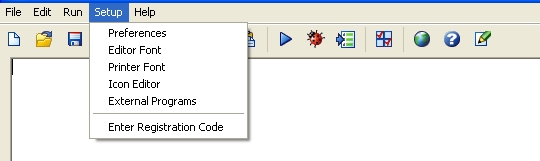
After you click on the "Enter Registeration Code" you will be shown a screen (Pic #2) where you can enter the information that was contained in the email you received from Carl.
Picture #2:
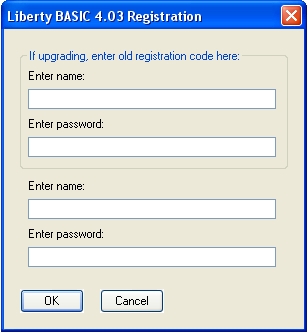
You will notice on this form that there are two areas to enter your name and password. The top area, enclosed with a frame, is used to enter your old user name and password if you are upgrading from a previous version. If you are a NEW user and entering this information for the very first time then you need to use the second set of boxes.
4) Enter the information from the email into the appropriate boxes
5) Click "Ok"
If all goes well you should be all registered and ready to use and enjoy your fully-registered copy of Liberty BASIC.